Tiko

01 / Admins

For admins

Set up Tiko in under a minute. Pick where your community talks, then enable the features you want.

  1. 01
    invite link

    Add Tiko with Administrator

    When adding Tiko through the Discord authorize screen, make sure the Administrator permission is checked. Tiko will not work without it.

  2. 02
    /setup

    Run setup

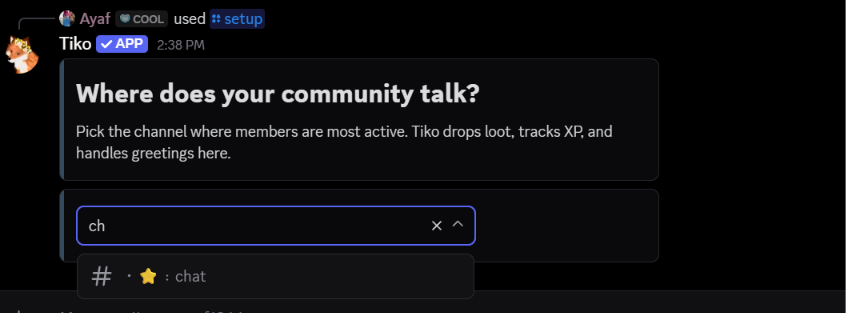
    Type /setup and Tiko asks “Where does your community talk?” Select your main chat channel. Most features just need an enable button — no docs, no complicated configuration.

  3. 03
    /setup

    Personalize Tiko

    Inside the setup panel, click the Setup button next to Custom Profile. Upload an avatar, set a banner, pick a nickname, and write a bio. It updates instantly and only affects your server.

  4. 04
    /setup

    Set up Welcome Rewards

    Make sure to enable the feature before or after setup. Click the Setup button next to Welcome Rewards, then pick a role to get pinged when someone joins, or click Auto Setup and Tiko creates one for you.

  5. 05
    /setup

    Set up Revival Rewards

    Make sure to enable the feature before or after setup. Click the Setup button next to Revival Rewards, then pick a role to get pinged when chat needs reviving, or click Auto Setup and Tiko creates one for you.

  6. 06
    /setup → Fine-tune

    Customize the welcome message

    Make sure to enable the feature before or after setup. Click Fine-tune at the bottom of the setup panel, then click Setup next to Welcome message. We recommend leaving the welcome channel unset so Tiko auto-follows your drop channel. Click Customize Embed to edit the text, color, and layout of the welcome embed.

  7. 07
    /setup → Fine-tune

    Configure the leveling system

    Make sure to enable the feature before or after setup. Click Fine-tune, then click Setup next to Leveling. Pick where level-up notifications get posted or leave it to auto-follow the conversation. Click Manage to exclude channels from XP, Configure to set roles for specific levels, and Customize to edit the level-up embed with a live preview.

  8. 08
    /setup → Fine-tune → Leveling → Configure

    Set up level roles

    Inside the leveling panel, click Configure next to Level roles. Click Add Role, pick a role from the dropdown, type the level it should be assigned at, and confirm. Tiko gives that role automatically when someone reaches the level. You can add as many as you want and remove any at any time.

  9. 09
    /setup → Fine-tune

    Set up Booster Rewards

    Click Fine-tune, then click Setup next to Booster Rewards. Enable the server boost embed to thank members when they boost, and enable the monthly loyalty embed to reward them again every 30 days they keep boosting. Click Customize on either one to edit the message text, embed layout, and colors with a live preview. You can also toggle which reward buttons the booster can claim.

  10. 10
    /setup → Fine-tune

    Set up the Drop System

    By default, Tiko drops lootboxes in the chat channel you picked during setup. Make sure to enable the feature from the Fine-tune panel. Extra drop channels are optional. Click Setup next to Drop System to add up to 3 more channels where drops can happen.

  11. 11
    /setup → Fine-tune

    Set up Hospitality

    Hospitality rewards members for talking with newcomers. Make sure to enable the feature first. Click Fine-tune, then click Setup next to Hospitality. Pick a role for Member of the Week. Tiko gives it automatically to the top member on the weekly hospitality leaderboard.

  12. 12
    /setup → Fine-tune → Hospitality Market

    Configure the Hospitality Market

    After posting the market, use the admin buttons at the bottom. Click Add to add a role to the shop: pick the role, enter a price in hospitality points, and optionally set an emoji. You can also add pages to group roles into categories, with up to 20 pages and 30 roles per page. Click Edit to change a role's price or emoji, reorder roles by price or manually, and rename or reorder pages. Click Remove to delete a role or page. Members who bought it get their points refunded and the role removed.

02 / Members

How to get started with Tiko

You do not need to learn everything at once. Start with one command, then let your progress lead you to the next thing.

  1. 01
    /quest

    Start with quests

    Complete the tasks to earn rewards and discover what your server has to offer.

  2. 02
    /daily

    Claim your daily reward

    Come back each day, claim your reward, and build a streak while you are at it.

  3. 03
    balance

    Check your balance

    Use your balance to keep track of what you have earned and decide what to spend it on next.

  4. 04
    welcome + revive

    Help keep the server alive

    Welcome new members and join chat revivals to earn Stars. Reply to newcomers to earn Hospitality Points.

  5. 05
    /market + /hospmart

    Spend what you earn

    Use /market to buy better tools, or browse /hospmart for custom cosmetic roles chosen by your admins.

  6. 06
    keep talking

    Keep chatting and unlock more

    Stay active to level up, earn better payouts, unlock mini-games, and open better loot.